How to get client approval on social posts without giving clients a login
Agencies usually send the exported video and captions by email, WhatsApp or a shared-drive link, or give the client a seat in their scheduler. The no-login option is a preview link the client opens in any browser to watch, comment, and approve or ask for changes. In ClipEmber that link needs no account, lasts 30 days by default, can be revoked, and works on every plan, including Free.
At a glance
Approval only needs the client to see three things: the video, the exact text for each network, and when it goes out. None of that requires access to your scheduler or to their social accounts.
Files sent over chat or email work, but feedback ends up scattered and nothing stops a post that was never approved. A seat in your scheduler keeps everything in one place, but it is one more login for the client to remember and for you to manage.
A preview link is the middle ground: one URL per post, no account, and the decision is recorded next to the post. With a hold switched on, the post can't go out until the client approves.
Never ask a client for their social password or a 2FA code just to show them a draft. Approval and account access are separate problems. For access, see how a client connects their own account through a link.
Before you start
Have the final version ready: the rendered video, one caption per network (a YouTube title, an Instagram caption and a TikTok caption are rarely the same text), and the time. Clients approve what they see, so anything that changes afterwards needs a second look.
If you use ClipEmber, these are the limits that apply to approval links. They come from the product code and were checked in our run.
| What | Measured | Source |
|---|---|---|
| Plans that include approval links | All, including Free | apps/web/src/app/(marketing)/pricing/page.tsx; no plan check in lib/approvals.ts, 2026-11-25 |
| Default link lifetime (at least 1 day after the last post, at most 90) | 30 days | shared/approvals.ts PREVIEW_LINK_TTL_DAYS; link created 2026-11-25 expired 2026-12-25 in our run |
| Longest comment or note | 2,000 characters | shared/approvals.ts REVIEW_COMMENT_MAX |
| Free plan publishing | 3 videos/month, 3 accounts | apps/web/src/shared/plan-matrix.ts (free), checked 2026-11-25 |
How to get approval without a scheduler
Email or WhatsApp: attach the exported video and paste each network's caption underneath, with the planned date and time. Ask for a reply that says “approved” so you have it in writing. This costs nothing; the downside is that every revision is a new file and a new thread, and the approval lives in someone's inbox, not next to the post.
Shared drive: put the video and a document with the captions in one folder and share it as “Anyone with the link”. Google says anyone with that link “can open the file without signing in to a Google Account”. Leaving comments without a Google Account is another matter: Google's visitor sharing needs an organization setting and a PIN, and its list of supported file types doesn't include video (Google Drive Help, checked 2026-11-25). In practice, feedback on the video still comes back by email or chat.
Either way, keep one rule: whatever you send for approval is exactly what you post. If you change the caption after the client said yes, send it again.
How to send a no-login approval link in ClipEmber
ClipEmber is a scheduler for short videos with a clipper and editor built in. An approval link covers one post: the same video on every account it goes to, each with its own caption and settings.
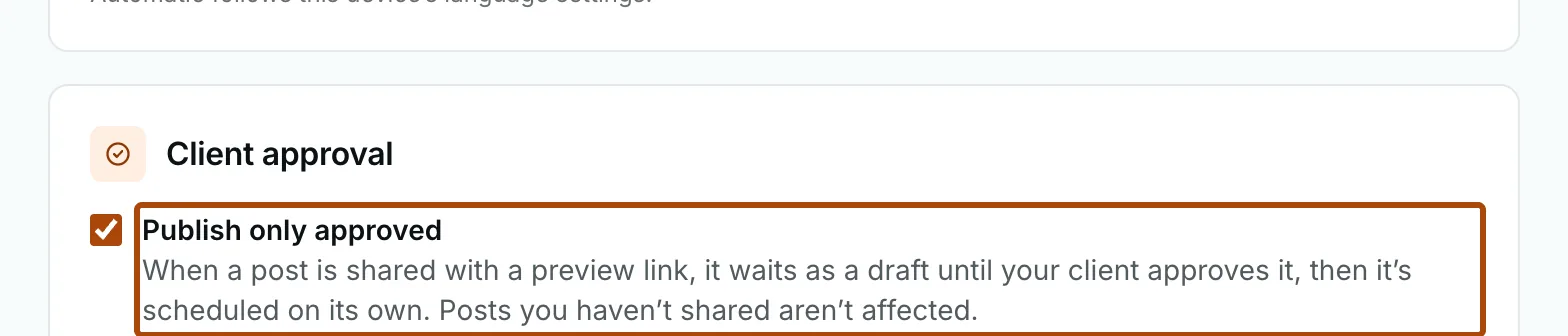
- Optional, once: in Settings, turn on “Publish only approved”. Shared posts then wait as drafts until the client approves. Without it, a post goes out at its time whatever the client says.
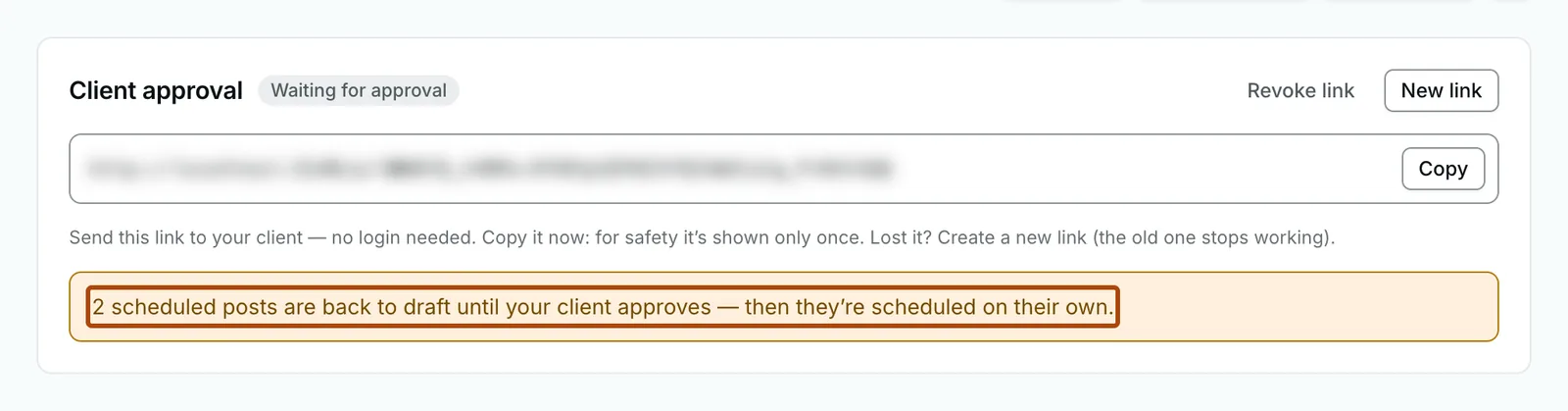
- Schedule the post as usual, open it from the calendar and find the Client approval panel. Press “Share for approval”.
- Copy the link right away: it is shown once, because only a hash of it is stored. Lost it? Create a new one, and the old link stops working. With the hold on, queued posts go back to draft at this moment.
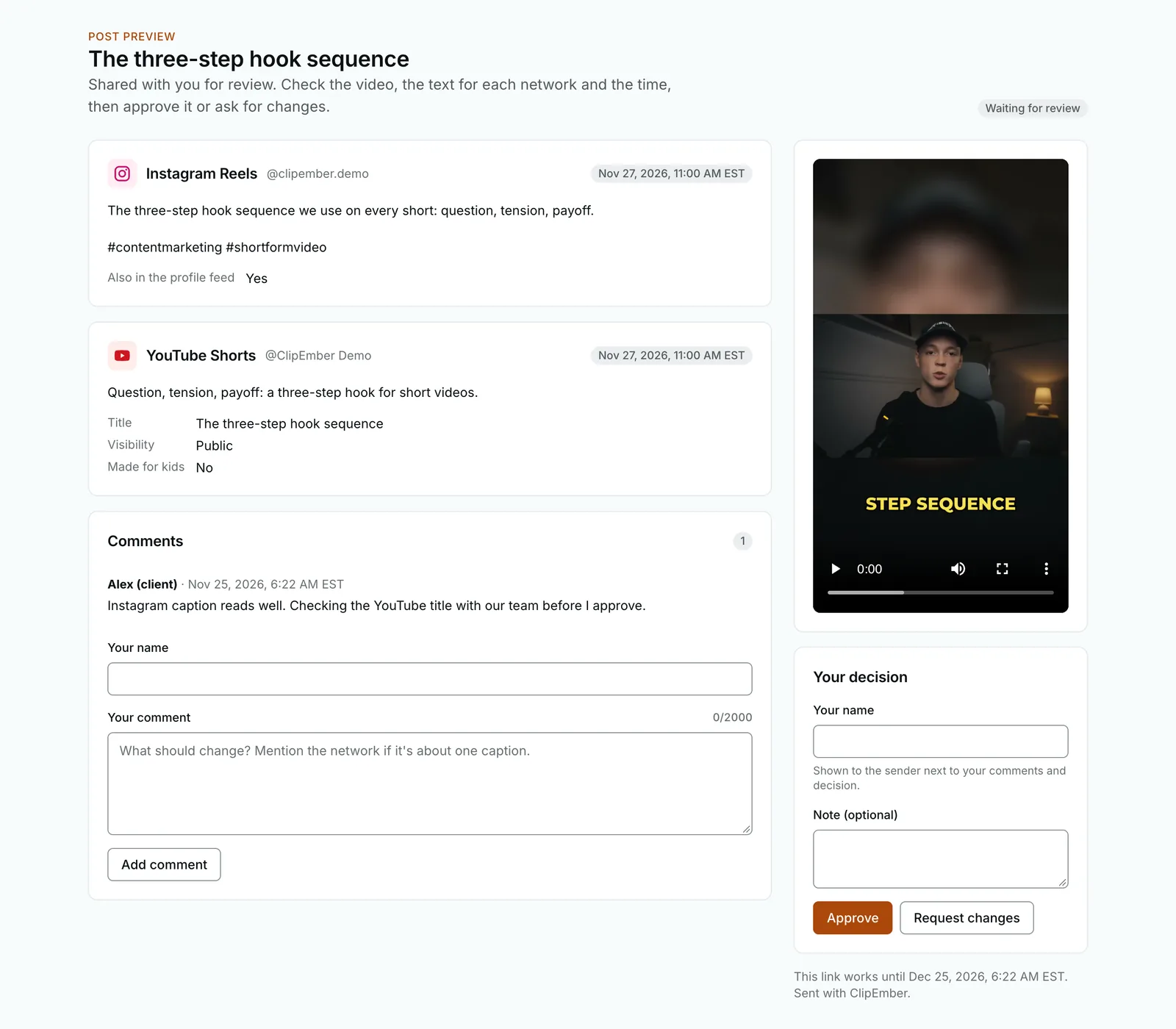
- Send the link however you already talk to the client: email, WhatsApp, Slack. They open it in any browser and see the video, each network's caption with the account and time, the network settings (for example YouTube visibility), and earlier comments.
- The client types a name, adds a comment if they want, and presses Approve or Request changes. They don't need an account, and the page sets no cookies.
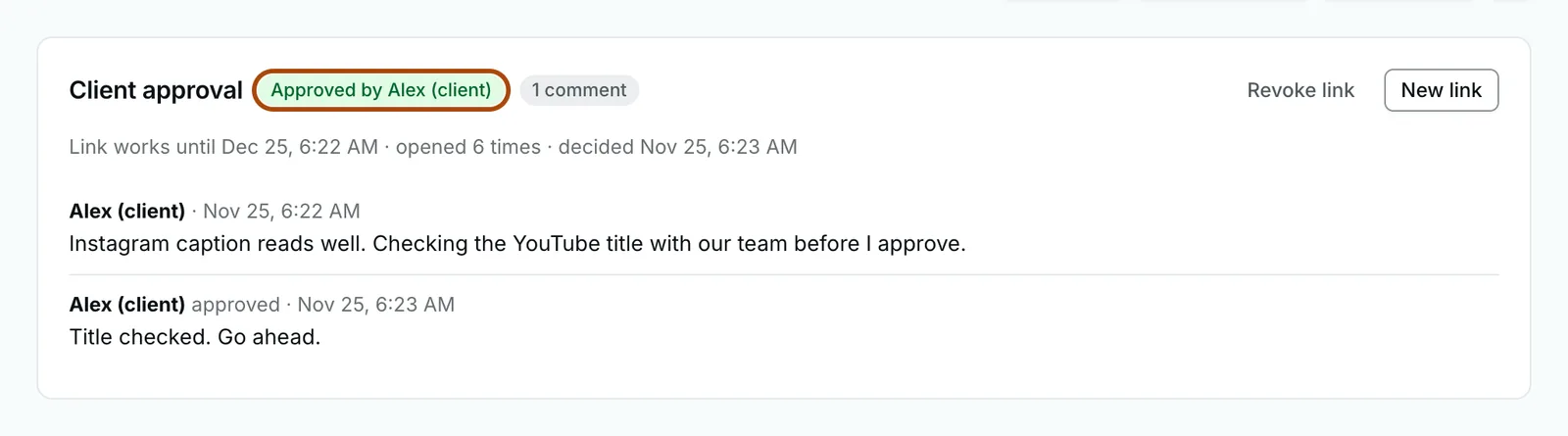
- You see the answer on the post, as a mark on the calendar and in the bell. The owner and the post's author also get an email, at most one per post every 15 minutes. After Approve, held drafts go back into the queue by themselves.

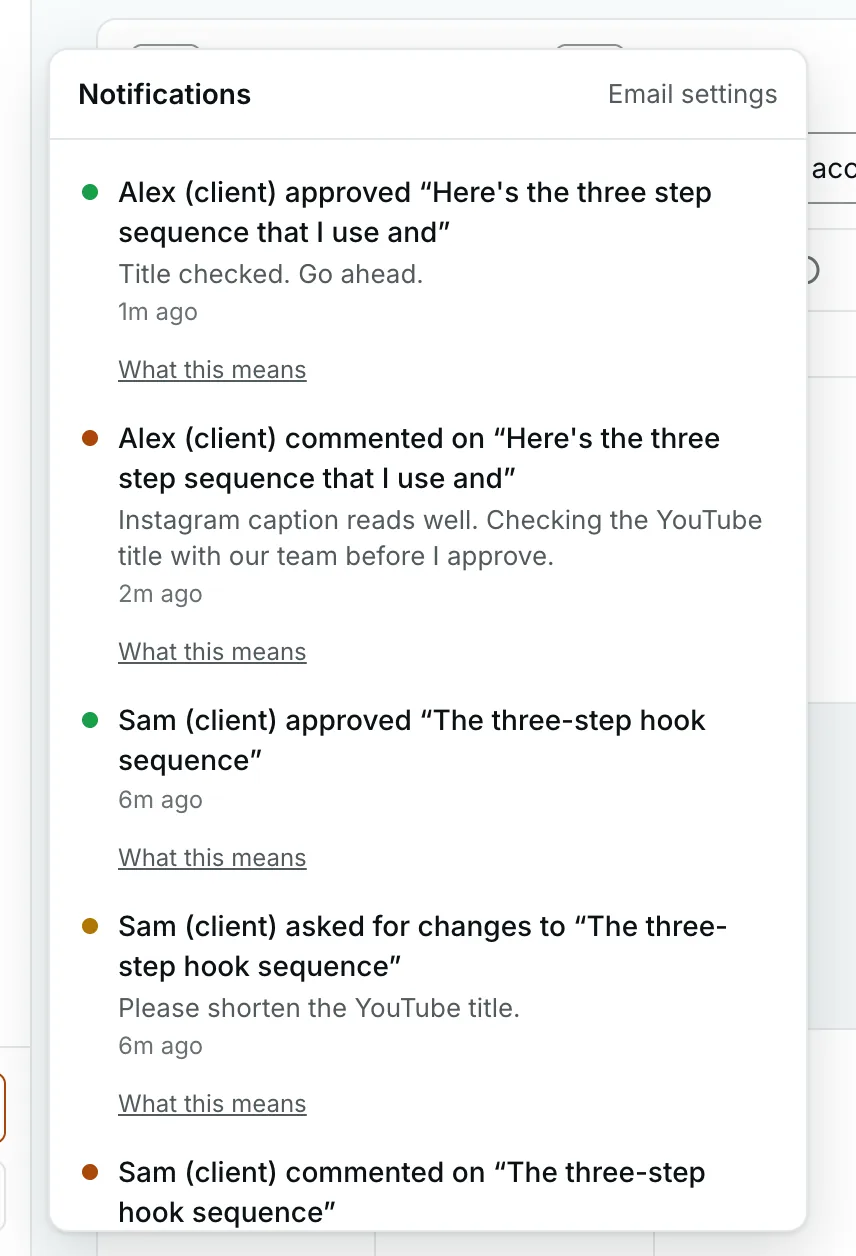
What happened when we tested it
We scheduled one clip to an Instagram Reels account and a YouTube Shorts account in our demo workspace, turned on “Publish only approved”, created a link, and then acted as the client from a separate session with no login and no cookies: opened the page, left a comment, asked for changes, then approved. Afterwards we edited the caption and revoked the link.
Two things surprised us. Asking for changes didn't release anything: the posts stayed drafts until the Approve. And three client actions within about a second produced one email, not three. The change request and the approval waited for the next 15-minute batch, while the bell showed all three straight away.
| What | Measured | Source |
|---|---|---|
| Queued posts held as drafts when the link was created | 2 of 2 | ClipEmber demo workspace, run 2026-11-25, POST /api/v1/approvals/:groupId/link → heldPosts: 2 |
| Login, cookies or account the client needed | None (0 Set-Cookie headers) | ClipEmber demo workspace, run 2026-11-25, /p/<token> opened without a session |
| Posts released after Request changes | 0 | ClipEmber demo workspace, run 2026-11-25, both posts still draft |
| Posts back in the queue after Approve | 2 of 2, same request | ClipEmber demo workspace, run 2026-11-25, decision API returned in 0.07 s |
| Owner emails for a comment, a change request and an approval within ~1 s | 1 | ClipEmber demo workspace, run 2026-11-25, email_log: one approval_activity row; rest batched (15-min window) |
| Approval after we edited the caption | Reset to waiting | ClipEmber demo workspace, run 2026-11-25, feed line “Approval reset after edit” |
| Revoked link | 404, same as a made-up link | ClipEmber demo workspace, run 2026-11-25, “this link is not available” |
Troubleshooting
“This link is not available” or a 404 page: the link was revoked, replaced by a newer one, or expired. All three look the same on purpose. Create a new link and send it again.
The post went out without approval: “Publish only approved” was off, or the post was never shared. The hold only applies to posts that have a link. An expired link still holds its posts; revoking the link is what releases them.
The approval disappeared: someone changed the caption, the video, a network's settings or the set of accounts after the client approved. That resets it, so the client approves what actually goes out. Moving only the time doesn't.
Approved, but the TikTok post still waits: client approval never makes TikTok's per-post choice (who can see it, comments, duets, stitches). See why a TikTok post can wait as a draft.
Approved, but the post failed at its time: approval doesn't change what the network accepts. The reasons and fixes are in failed posts.
What ClipEmber doesn't do here
One link is one post. There is no single link that shows a client a whole week or a month of posts to approve in one go.
The client can't edit the caption or move the time on the page; they comment and you make the change. Each edit after an approval sends the post back for a new one.
The name on a decision is whatever the person typed. Anyone who has the link can approve, so send it only to the person who signs off, and revoke it if it goes further.
The page says “Sent with ClipEmber”; there is no custom domain or white-label version.
Separately, connect links (a client connecting their own account without giving you a password) cover TikTok, YouTube and Instagram. LinkedIn and Bluesky aren't on them yet.
What other schedulers publish
Metricool: clients approve “from a link in an email, with no Metricool account”, “the link is valid for 72 hours”, editing a post after sending it resets the review, and the feature is on the Advanced plan (as published by Metricool, checked 2026-11-25).
Cloud Campaign: no-login approval links on every plan, with white-label links on its Team and Agency plans (as published by Cloud Campaign, checked 2026-11-25).
For Buffer, see our ClipEmber vs Buffer comparison, which lists Buffer's own pricing page and the date we checked it. All plans and limits for ClipEmber are on pricing, and the full reference for approval links is in client approval help.
How we made this
Drafted by ClipEmber's content agent and checked by a person on 2026-11-26. Every ClipEmber step was run in our own demo workspace on 2026-11-25 with demo accounts; the client side was opened without a login. Limits come from the product code on the same day. Screenshots are ours (source video: Ethan Shaw, “How To Create Viral Content with Hooks and Storytelling”, CC BY, youtube.com/watch?v=10IfDiFHomM). We did not test the email and shared-drive methods; they are described from Google's help pages.
Sources
Try it on your own video.
5 free videos every month, no card required.