Can you post the same video on TikTok, Reels and Shorts?
Yes. If the clip is yours, you can post the same file to TikTok, Instagram Reels and YouTube Shorts. YouTube's October 2026 change cuts reach for videos re-uploaded from other creators without adding anything, not for your own clip. Our 30.7-second 1080×1920 test file met every published length, size, codec and frame-rate limit of all three. What has to differ is the text: caption length, YouTube's 100-character title and hashtag caps.
Key findings
Your own clip can go to all three networks. YouTube's update of 1 October 2026 targets content "re-uploaded from other creators without adding anything of your own", in TeamYouTube's words. A clip you filmed or own is original content in that sense.
One export fits all three. Our 30.7-second, 1080×1920, 30 fps H.264 file met every published limit on length, size, resolution, codec, frame rate and bitrate for TikTok's Content Posting API, Instagram's Reels publishing API and YouTube Shorts. The longest common length is 3 minutes: that is YouTube's Shorts cap and the length every TikTok creator can post.
One container detail didn't match Instagram's spec word for word: the file has an edit list on each track, as ffmpeg writes by default, and Instagram asks for none. We didn't upload this file to Instagram in this run, so we don't know whether that matters in practice.
The text is what has to change: TikTok and Instagram allow 2,200 characters, YouTube takes a separate 100-character title, Instagram allows 30 hashtags, and YouTube ignores every hashtag on a video that has more than 60.
Does YouTube treat reposted clips as unoriginal?
Only if they are someone else's. On 1 October 2026 TeamYouTube posted "Prioritizing original content on Shorts" in the YouTube Help Community: recommendations will further favor original content and reduce the reach of videos re-uploaded from other creators. Channels that mainly aggregate or re-upload other creators' videos without significant changes will likely get less distribution in the Shorts feed.
The post asks creators who use someone else's clips to add their own commentary, edits or storytelling, and says minor technical edits or template-based changes made just to alter a video are not the point. It doesn't say how much editing is enough, and YouTube hasn't published a threshold anywhere we found. We don't know where the line is, and we don't guess.
Posting your own clip on TikTok and Instagram as well isn't re-uploading another creator's content. If your clip comes from someone else's video, the license question comes first: see is clipping legal and how to clip Creative Commons videos. YouTube's three-minute Shorts page adds one more rule: a Short longer than one minute with an active copyright claim is blocked worldwide.
TikTok and Instagram: we found no dated, official page on reposting your own videos from other networks, so we don't describe a rule for them. On watermarks, the one current official statement we found is TikTok's Content Sharing Guidelines (last updated 4 August 2026): apps that post through TikTok's API must not add their brand name, logo or watermark to creators' videos. Export a clean file from your editor rather than saving a video back out of one network's app.
What we tested
On 25 November 2026 we took a 30.7-second vertical clip from our demo workspace (cut from Ethan Shaw's 13-minute talk on hooks, CC BY), downloaded the file exactly as ClipEmber renders it, and read it with ffprobe. We also parsed the MP4 boxes to see where the index (moov) sits and whether there are edit lists.
Then we compared every property with the upload limits each network publishes for developers: TikTok's Content Posting API Media Transfer Guide and Direct Post reference, the Reels section of Instagram's Graph API media reference, and YouTube Help's page on three-minute Shorts. We used API documents because that is how scheduling tools upload, and because TikTok's help pages don't render outside a browser.
We didn't upload the file to real TikTok, Instagram or YouTube accounts in this run, and we didn't measure views or reach.
| What | Measured | Source |
|---|---|---|
| Length | 30.7 s | ffprobe on a clip exported from the ClipEmber demo workspace, run 2026-11-25 |
| Resolution and shape (square pixels) | 1080×1920, 9:16 | ffprobe on a clip exported from the ClipEmber demo workspace, run 2026-11-25 |
| Video codec (High profile, level 4.0, 4:2:0, progressive) | H.264 | ffprobe on a clip exported from the ClipEmber demo workspace, run 2026-11-25 |
| Frame rate (constant) | 30 fps | ffprobe on a clip exported from the ClipEmber demo workspace, run 2026-11-25 |
| Video bitrate / whole file | 672 kbps / 809 kbps | ffprobe on a clip exported from the ClipEmber demo workspace, run 2026-11-25 |
| Audio (AAC-LC, stereo) | 44.1 kHz, 128 kbps | ffprobe on a clip exported from the ClipEmber demo workspace, run 2026-11-25 |
| File size | 3.1 MB | ffprobe on a clip exported from the ClipEmber demo workspace, run 2026-11-25; 3,102,725 bytes |
| Index (moov) position | start of the file | MP4 box parse of the same file (moov offset, elst entries, x264 settings), run 2026-11-25 |
| Closed GOP (x264 open_gop=0) | yes | MP4 box parse of the same file (moov offset, elst entries, x264 settings), run 2026-11-25 |
| Edit lists (one entry per track) | 2 | MP4 box parse of the same file (moov offset, elst entries, x264 settings), run 2026-11-25 |
How the file compared with each network's limits
TikTok: everything passed. The Media Transfer Guide accepts MP4, WebM or MOV; H.264, H.265, VP8 or VP9; 23 to 60 fps; 360 to 4,096 pixels per side; up to 4 GB. All TikTok creators can post 3 minutes, some 5 or 10, and the API takes up to 10 minutes; the exact cap for an account comes from the API's creator info as max_video_post_duration_sec.
Instagram Reels: every number passed. The Graph API asks for MOV or MP4 with the moov atom at the front, H.264 or HEVC with closed GOP and 4:2:0, AAC at 48 kHz or less, 23 to 60 fps, at most 1,920 pixels across, up to 25 Mbps, 3 seconds to 15 minutes and 300 MB. It recommends 9:16 to avoid cropping. The exception is the edit-list line above.
YouTube Shorts: passed. A square or vertical video up to 3 minutes, uploaded on or after 15 October 2024, is categorized as a Short. The Shorts pages we checked set only length and shape, so that is the whole test here.
| What | Measured | Source |
|---|---|---|
| TikTok: length vs 3 min every creator can post | 30.7 s, passes | TikTok Content Posting API, Media Transfer Guide, checked 2026-11-25 |
| TikTok: 1080×1920 vs 360–4096 px per side | passes | TikTok Content Posting API, Media Transfer Guide, checked 2026-11-25 |
| TikTok: 30 fps vs 23–60 fps; H.264 in MP4 | passes | TikTok Content Posting API, Media Transfer Guide, checked 2026-11-25 |
| TikTok: 3.1 MB vs 4 GB | passes | TikTok Content Posting API, Media Transfer Guide, checked 2026-11-25 |
| Instagram: length vs 3 s–15 min | 30.7 s, passes | Instagram Graph API, IG User Media reference (Reels specs), checked 2026-11-25 |
| Instagram: 1080 px across vs 1,920 max; 9:16 | passes | Instagram Graph API, IG User Media reference (Reels specs), checked 2026-11-25 |
| Instagram: 0.8 Mbps vs 25 Mbps; 3.1 MB vs 300 MB | passes | Instagram Graph API, IG User Media reference (Reels specs), checked 2026-11-25 |
| Instagram: AAC 44.1 kHz vs 48 kHz max; 30 fps vs 23–60 | passes | Instagram Graph API, IG User Media reference (Reels specs), checked 2026-11-25 |
| Instagram: moov at front, closed GOP, 4:2:0 | passes | Instagram Graph API, IG User Media reference (Reels specs), checked 2026-11-25 |
| Instagram: "no edit lists" | 1 per track, not tested | Instagram Graph API, IG User Media reference (Reels specs), checked 2026-11-25; MP4 box parse of the same file (moov offset, elst entries, x264 settings), run 2026-11-25 |
| YouTube Shorts: length vs 3 min, vertical or square | passes | YouTube Help, Understand three-minute YouTube Shorts, checked 2026-11-25 |
What to change for each network
Length: keep it at 3 minutes or less if one file has to go everywhere. Longer than that, YouTube treats it as a regular video, not a Short, while Instagram (up to 15 minutes through its API) and TikTok accounts allowed longer videos can still take it.
Caption: TikTok's API allows 2,200 characters (counted in UTF-16 units, so some emoji count as two); Instagram allows 2,200 characters with at most 30 hashtags and 20 @ mentions. YouTube splits the text into a title of up to 100 characters and a description of up to 5,000 bytes; YouTube ignores all hashtags on a video that has more than 60. A caption written for TikTok often works on Instagram as is, but the YouTube title needs its own line.
Cover: Instagram's API takes a cover image (JPEG up to 8 MB; it uses the middle 9:16 area of other shapes) or a frame offset, and uses the first frame if you set neither. Make the first frame readable on its own, because it is what you get when no cover is chosen. We didn't check TikTok's and YouTube's cover options for this article.
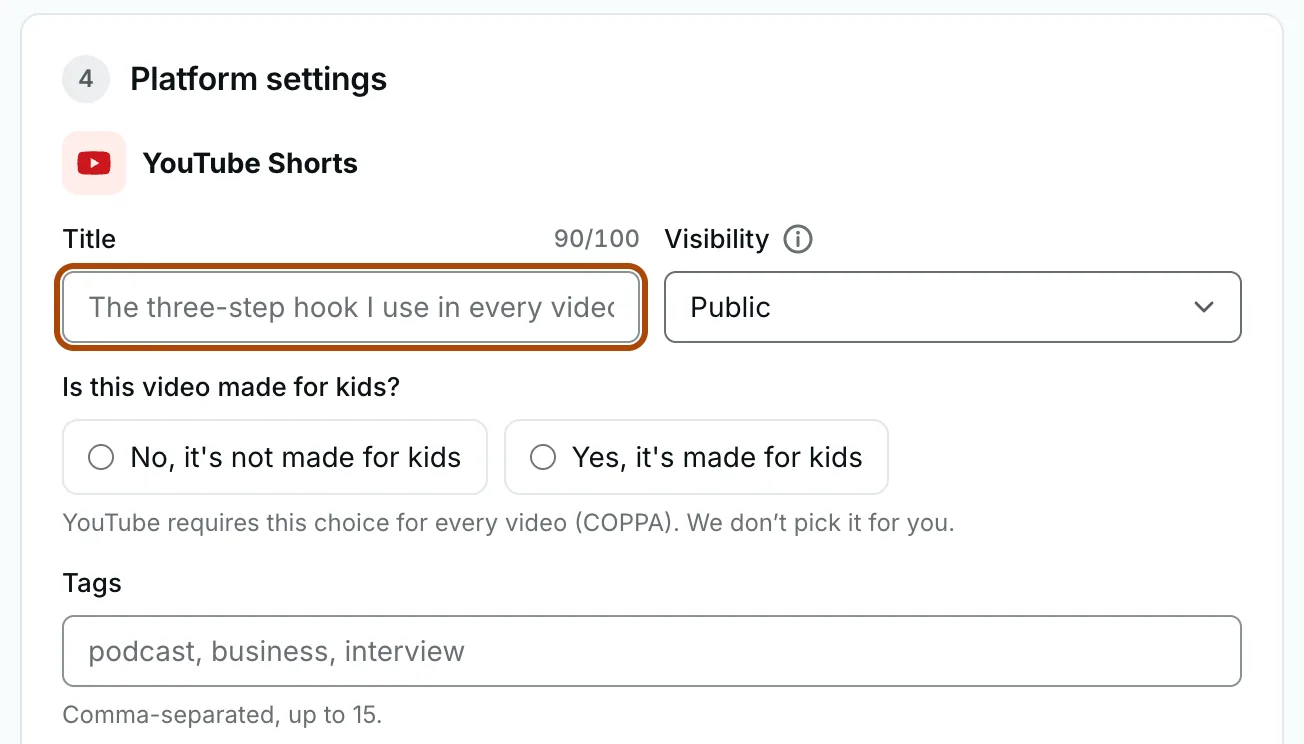
Settings that exist on only one network: TikTok's API makes the app ask who can see the post, from the options that account allows. YouTube asks whether the video is made for kids. Instagram can also show a Reel in the profile feed. None of these can be copied from one network to another.
| What | Measured | Source |
|---|---|---|
| TikTok caption (UTF-16 units) | 2,200 | TikTok Content Posting API, Direct Post reference, checked 2026-11-25 |
| Instagram caption | 2,200 chars, 30 hashtags, 20 @ | Instagram Graph API, IG User Media reference (Reels specs), checked 2026-11-25 |
| YouTube title | 100 characters | YouTube Data API, Videos resource (snippet), checked 2026-11-25 |
| YouTube description | 5,000 bytes | YouTube Data API, Videos resource (snippet), checked 2026-11-25 |
| YouTube: hashtags ignored above | 60 per video | YouTube Help, Hashtags on YouTube, checked 2026-11-25 |
| Longest length all three accept as a short | 3 min | YouTube Help, Understand three-minute YouTube Shorts, checked 2026-11-25; TikTok Content Posting API, Media Transfer Guide, checked 2026-11-25; Instagram Graph API, IG User Media reference (Reels specs), checked 2026-11-25 |
How to post one clip to TikTok, Shorts and Reels in ClipEmber
ClipEmber is a scheduler for short videos with a clipper and an editor built in. One video becomes one post per account, each with its own caption and settings. You can do the same by hand in each app; the steps below put the three posts in one schedule.
On the Free plan you can publish 3 videos a month to up to 3 accounts. One video sent to TikTok, YouTube and Instagram counts as one of the 3. Clips rendered on Free carry a small clipember.com mark on downloads and on the YouTube and Instagram copies; TikTok gets the copy without it, because of the guideline above. Paid plans remove the mark (pricing).
What ClipEmber doesn't do here: it doesn't publish Instagram Trial Reels, and it doesn't set a custom cover for TikTok, Reels or Shorts, so each network uses its own default. It doesn't remux files to remove edit lists. It sends the file you picked; it doesn't make a different cut per network.
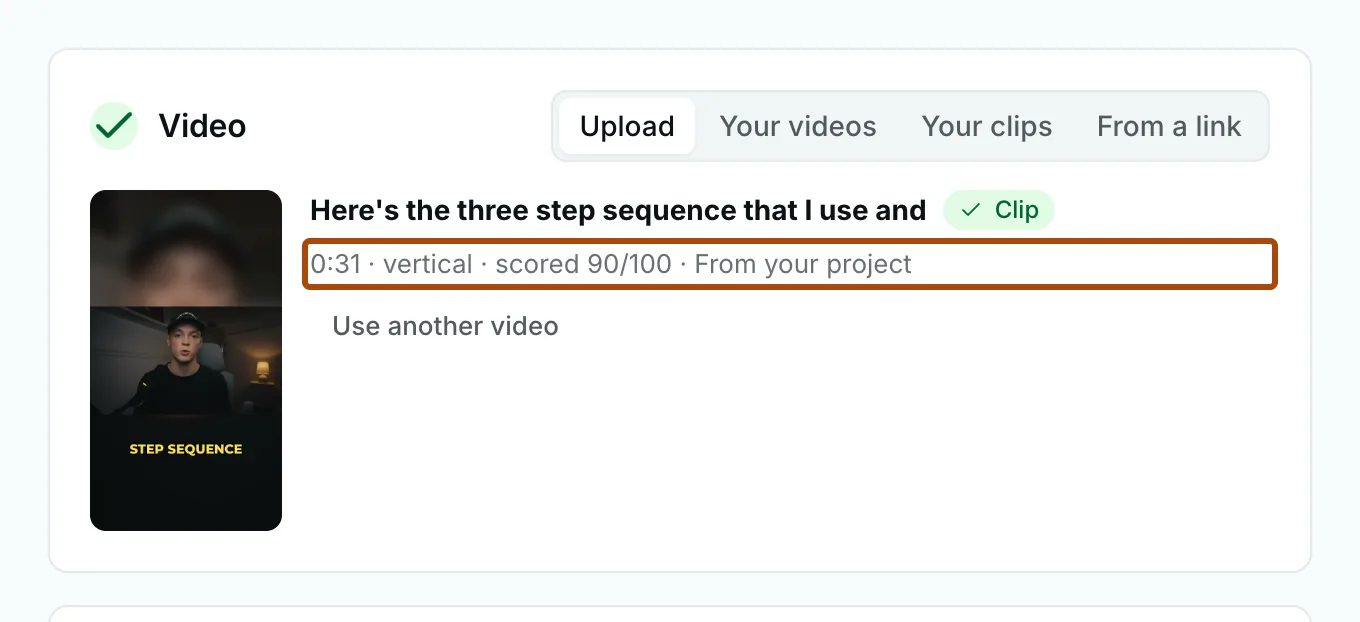
- Click New post and pick the video: upload a file, pick one of your videos or clips, or paste a link. The composer shows its length and whether it is vertical.
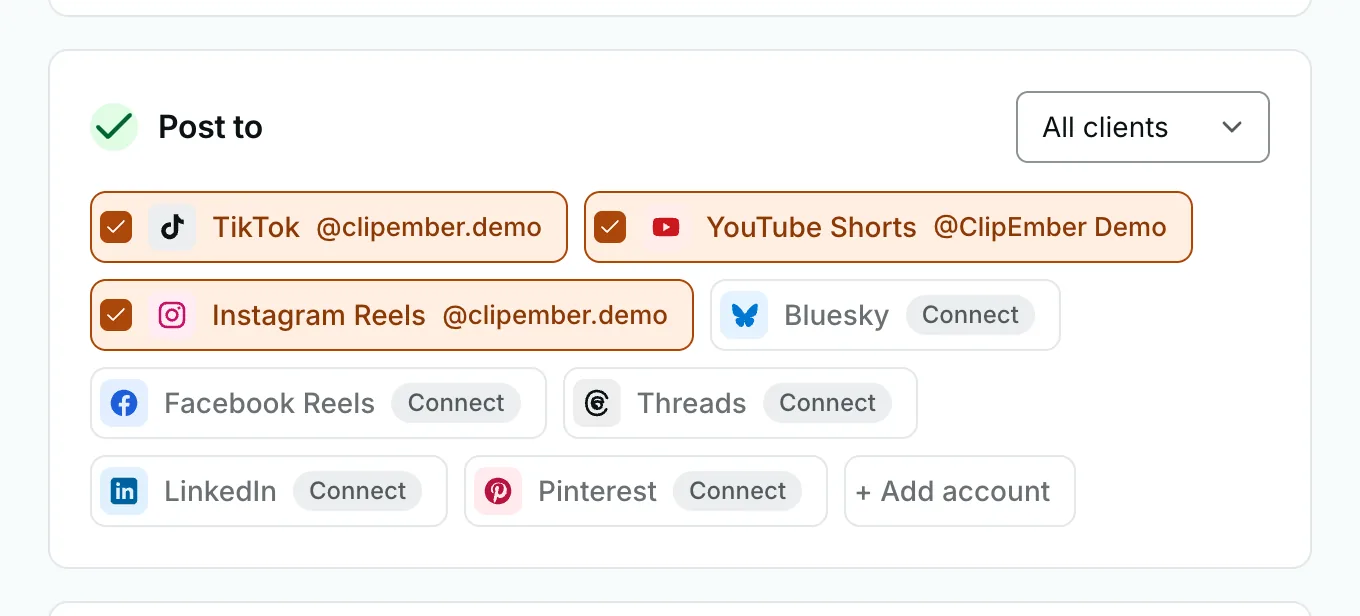
- Under Post to, tick a TikTok, a YouTube Shorts and an Instagram Reels account. Each ticked account becomes its own post.
- Write the shared caption, then open a network's tab and click Write a separate one to change only that network's text. The counter shows that network's limit (2,200 for TikTok and Instagram). For a clip, you can leave the caption empty and ClipEmber writes one when the post goes out.
- In Platform settings, set the YouTube title (if empty, the caption's first line is used, up to 100 characters), visibility and the made-for-kids answer, choose who can see the TikTok post, and decide whether the Reel also shows in your profile feed.
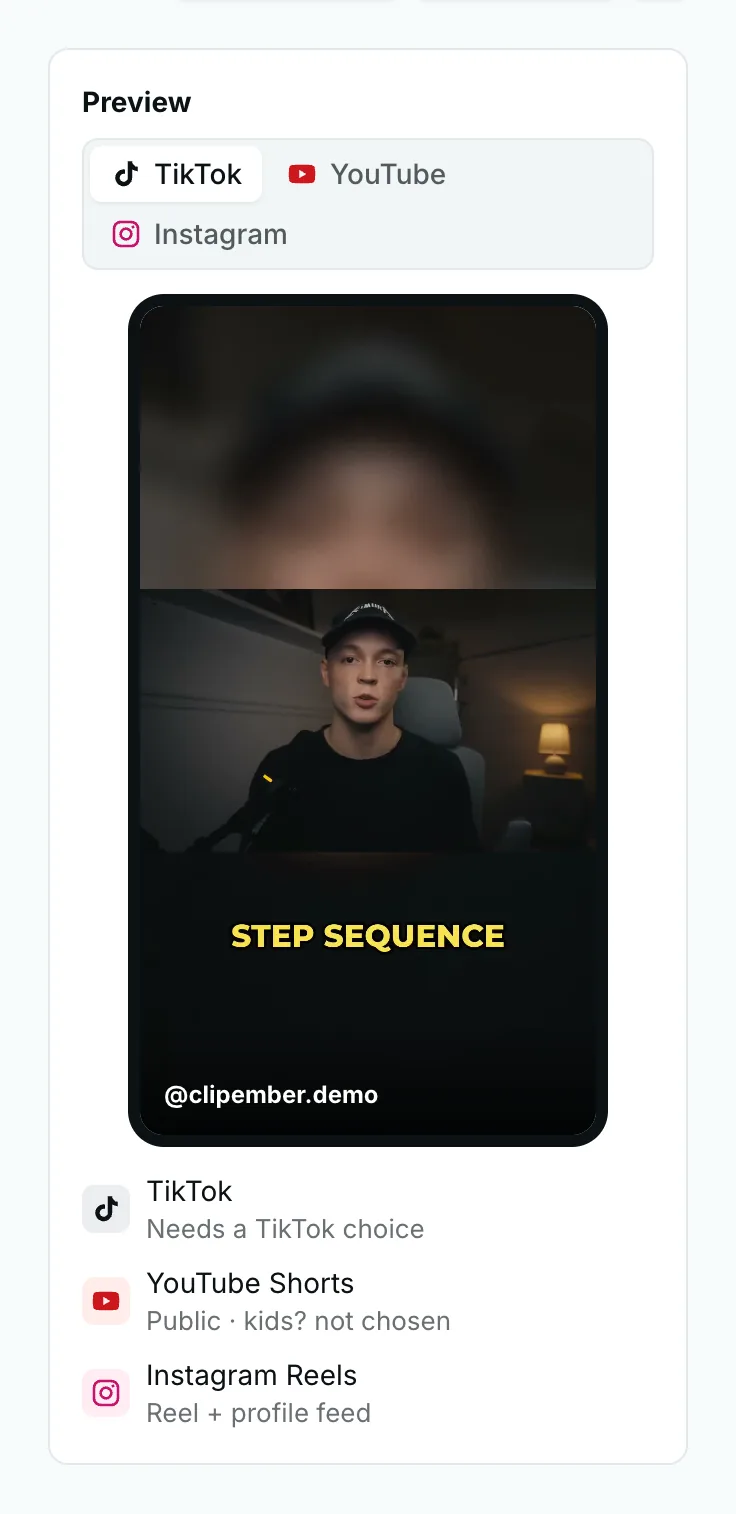
- Check the preview: it lists what each network still needs. Then pick a time and click Schedule 3 posts. If the video is longer than a network allows (for TikTok, your account's own limit), the composer tells you before scheduling.
| What | Measured | Source |
|---|---|---|
| Free plan: videos published a month (one video on several networks counts once) | 3 | ClipEmber code (shared/plan-matrix.ts, lib/publish-quota.ts), checked 2026-11-25 |
| Free plan: connected accounts | 3 | ClipEmber code (shared/plan-matrix.ts, lib/publish-quota.ts), checked 2026-11-25 |
Limits of this test
One clip, one render path, checked against documents rather than live uploads. A file from your phone or another editor can differ: variable frame rate, HDR, a 4K export or a long keyframe interval are worth checking with ffprobe before you post.
We measured whether one file can go everywhere, not how it performs. We have no data on whether posting the same clip on three networks changes views on any of them, and we make no claim about it. Our demo workspace runs without plan limits; the plan numbers above come from ClipEmber's code. If a post doesn't go through, see why a YouTube upload comes out private and why a TikTok post stays a draft.
How we made this
Drafted by ClipEmber's content agent and checked by a person on 2026-11-26. The file test was run in our own demo workspace on 2026-11-25: one clip downloaded as rendered, read with ffprobe and an MP4 box parser, and compared with each network's developer documentation checked the same day. Nothing was posted to a real account. Screenshots are ours (demo workspace, demo accounts); source video: Ethan Shaw, "How To Create Viral Content with Hooks and Storytelling", CC BY. Numbers link to their source.
Sources
- TeamYouTube: Prioritizing original content on Shorts (YouTube Help Community, 1 October 2026)
- YouTube Help: Understand three-minute YouTube Shorts
- YouTube Help: Upload YouTube Shorts
- YouTube Help: Hashtags on YouTube
- YouTube Data API: Videos resource
- TikTok Content Posting API: Media Transfer Guide
- TikTok Content Posting API: Direct Post reference
- TikTok Content Posting API: Query Creator Info
- TikTok Content Sharing Guidelines (updated 4 August 2026)
- Instagram Graph API: IG User Media (Reels specifications)
Try it on your own video.
5 free videos every month, no card required.